


Invoice Maker by Billdu
4.8571.00 Reviews
App Specs
- Version
- 26.6.11
- Updated On
- License
- Free
- Downloads
- 500,000+
- Developer
- Billdu LTD
- Categories
- Business
- Platform
- Android, iOS
Screenshots
 Analysis by AppCompare
What makes a mobile invoicing tool useful to me is not a long feature list; it is whether I can turn a finished job into a clear request for payment before the details fade from memory. Invoice Maker by Billdu is built around that practical task. It is a business app from Billdu LTD, and its focus on estimates and invoices suits people who need to prepare client paperwork without making a full accounting system part of every workday.
I would think of it as a convenient front end for routine billing rather than a replacement for every financial tool a business might need. A freelancer can use it to keep a client-facing document tidy, while a small service business can make estimates and invoices part of the same mobile workflow. That distinction matters: the app is most appealing when the main bottleneck is getting billing done promptly, not when the business needs detailed bookkeeping or complex financial reporting.
Why creating an invoice is the central task
The strongest reason to consider Billdu is the way it brings invoice creation close to the work itself. When a job is complete, I do not want to wait until I am back at a desk, hunt through messages for a client’s details, and rebuild the same document from scratch. A prepared invoice workflow can reduce those small steps and make it easier to send a professional-looking request while the job is still fresh in everyone’s mind.
That convenience is especially useful for people whose work happens away from an office: a tradesperson finishing a callout, a consultant wrapping up a short engagement, or a photographer checking the final details of a booked service. The phone is already where the client conversation and job notes happen, so handling billing there can help keep the next administrative step from slipping to the end of the week.
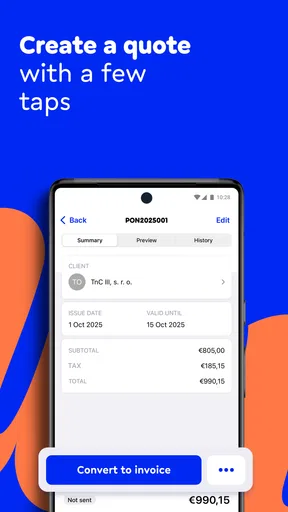
Estimates add another useful stage before the invoice. I would use one when a customer needs to approve the expected work before I commit to it, then treat the approved scope as the reference point for the final bill. This is a simple but valuable habit: agreeing on the work in writing can help prevent confusion about what the customer expected to pay for. It does not replace a clear contract for complicated projects, but it can make everyday jobs easier to track.
How I would fit it into a working day
Imagine I run a small repair service and finish a job at a customer’s home. Before leaving, I check the agreed work and the client details, prepare the invoice, and review it rather than relying on a half-remembered note later. If the customer asked for a price before the visit, an estimate gives me a natural starting point for that conversation. The practical gain is not just speed; it is having the amount and description in front of both sides while the work is still easy to discuss.
My advice would be to settle on a consistent way of describing common work before relying on mobile invoicing during a busy day. Keep service names recognizable, separate distinct tasks instead of burying them in one vague line, and take a moment to check quantities and totals before sending. Those habits make an invoice easier for a client to understand and easier for me to revisit later. A polished layout cannot fix an unclear description, so the quality of the information still depends on the person preparing it.
Worth Reading Before You Choose

EA SPORTS FC Mobile 26 Is a Bigger Football Game, but It Takes Time

Flipboard Shows What News Apps Must Do Beyond the Feed

Switching to Android Auto Means Rethinking Your Driving Routine

Google Calendar Makes a Crowded Week Easier to Manage

Ludo King Makes the Most of the Minutes Between Plans

Baby Panda World Brings Quick Play to Modern Phones, but Its Game Library Feels Busy
For repeat clients, I would also treat the customer record as a small time-saving tool: check existing details before making a new entry, and correct outdated information when I notice it. That reduces avoidable retyping and the risk of sending paperwork with a stale address or contact detail. It is a modest workflow improvement, but it matters when several jobs compete for attention.
Where it sits among invoicing options
Compared with writing an invoice in a word processor or spreadsheet, a dedicated invoice maker is more focused on producing a consistent client document. A spreadsheet can be flexible, and it may be enough for someone who sends only occasional bills, but the user has to maintain the layout and formulas carefully. A general accounting package may offer a broader view of a business’s finances, yet that extra scope can feel like overhead if all I need is to prepare an estimate and invoice on the go.
Billdu’s appeal sits between those approaches. I would consider it when mobile convenience and presentable billing matter more than building a custom spreadsheet, but I would not assume that an invoice app alone covers every accounting obligation. A business that needs extensive reporting, inventory controls, payroll, or a tightly defined bookkeeping process should compare dedicated accounting options against its actual requirements before making this the center of its financial setup.
One useful trade-off to think through is where the authoritative record should live. If a business already has a bookkeeping system, it should decide how invoices created on a phone will be recorded there and who checks that nothing is missed. Keeping customer documents in one workflow and financial records in another can work, but only if the handoff is deliberate. I would test that routine with a few ordinary jobs before depending on it during a busy month.
Billdu is free to download, though it includes in-app purchases ranging from $7.99 to $239.99 per item. I would check which tools are available at the level I intend to use before moving an entire workflow into it, rather than assuming every useful option is included at no cost. The app has a 4.8 average from around 13,000 ratings, and more than 100,000 installs; those figures suggest it has found an audience, but they do not tell me whether a particular plan fits my own billing volume or business needs.
Getting Started with Invoice Maker
First things first, downloading Invoice Maker by Billdu is a breeze. Available on both Android and iOS, the app installs quickly, and before you know it, you’re ready to start organizing your financial chaos. The user interface is sleek and intuitive. From the moment you open it, you get this feeling that everything is exactly where it should be. No need to fumble around or search for features. It’s all laid out in a way that just makes sense.
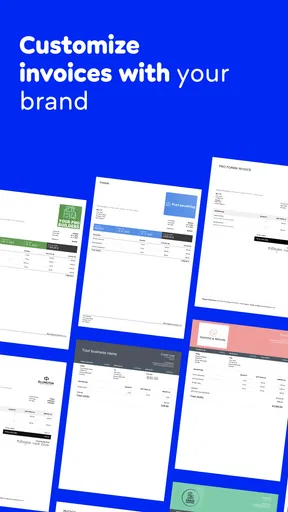
Once you’re in, setting up your account is as easy as pie. You can customize your invoices with your company’s logo and color scheme, giving them a professional touch. And yes, you can do this without needing a degree in graphic design!
Features That Make Life Easier
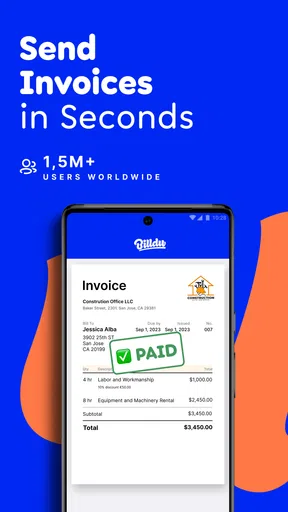
What really sets Billdu apart are its features. Let’s talk about creating invoices. It’s as simple as filling in a template. You enter the client’s information, list the services or products, and boom—you’ve got yourself a polished invoice. The app also lets you preview invoices before sending them off, ensuring everything is just right.
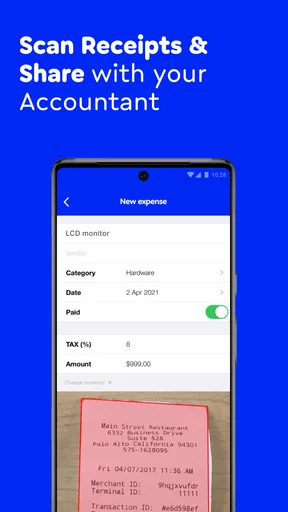
Now, let’s chat about expense tracking. I love that you can snap a photo of your receipts and store them digitally. This feature is a lifesaver for those of us who tend to misplace paper receipts. Plus, the app automatically categorizes your expenses, which helps keep your records neat and tidy.
One of the standout features has to be the automatic reminders. How many times have you forgotten to follow up on a payment? With Billdu, you can set reminders to nudge your clients about outstanding payments. It’s like having a personal assistant who’s always got your back.
Integration and Accessibility
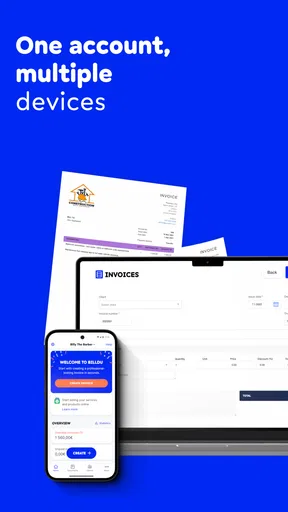
Integration is another strong point for this app. Billdu syncs seamlessly with other tools like Google Drive and Dropbox, making it simple to store and access your documents. Plus, the app is cloud-based, meaning you can manage your invoices and expenses from anywhere. Whether you’re at your desk or on the go, your data is always at your fingertips.
The app also supports multiple currencies and languages, which is a huge plus for those doing business internationally. It’s evident that Billdu has put a lot of thought into making their app as inclusive and versatile as possible.
The Bottom Line
After spending some quality time with Invoice Maker by Billdu, it’s safe to say that this app is a game-changer for freelancers, small business owners, and anyone else who deals with invoicing and expense tracking. The ease of use, coupled with a robust set of features, makes it a must-have tool in your business arsenal.
Whether you’re just starting out or you’ve been in the game for a while, this app can simplify your financial management in a way that feels almost magical. So, why not give it a try? It might just become your new favorite app.
Who is most likely to benefit
I see the clearest fit for solo workers and small teams that send routine estimates and invoices, especially when they do not want to wait until they are at a computer. The app is also worth considering for someone who is moving away from informal notes and wants a more consistent way to present charges to clients. Its business focus makes it less relevant for people who only need to split household bills or keep a personal spending diary.
It may not be the right choice for a business that requires a highly customized accounting workflow or has strict internal approval steps before a bill can be sent. In those cases, a more comprehensive finance platform—or a spreadsheet connected to an established bookkeeping process—may be a better fit. I would also skip it if I rarely invoice anyone and already have a reliable method that takes little time; adding another app is not automatically an improvement.
The app is free to install, but in-app purchases range from $7.99 to $239.99 per item, so I would make the purchase decision after mapping my real needs rather than upgrading on impulse. Invoice Maker by Billdu is rated for teens, runs on Android 7.0 or later, and its current version is 26.2.10. It was released on May 31, 2016, and has built a 4.8 average from around 13,000 ratings, with more than 100,000 installs. I would treat its popularity as a reason to investigate it, not as a substitute for checking whether its available options suit my work.
My practical recommendation is to try the core routine with a real but low-stakes job: prepare an estimate if the customer needs one, convert the agreed work into a clear bill, and decide how you will file the record afterward. If that flow saves effort without making your accounts harder to reconcile, the app is doing something useful. If you find yourself duplicating every entry in another system or paying for tools you do not need, a simpler option may serve you better.
Pros
- User-friendly interface simplifies navigation.
- Customizable templates enhance brand identity.
- Supports multiple currencies for global use.
- Seamless integration with accounting software.
- Offers real-time invoice tracking.
Cons
- Limited offline functionality limits access.
- Subscription costs may be high for small businesses.
- Occasional syncing issues reported.
- Some features locked behind premium plans.
- Customer support response can be slow.
FAQs for Invoice Maker by Billdu
What features does Invoice Maker by Billdu offer?
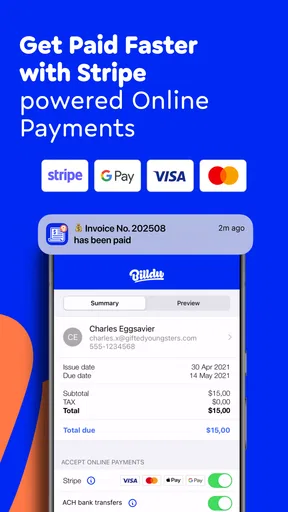
Invoice Maker by Billdu provides a comprehensive set of features, including customizable invoice templates, expense tracking, and automatic payment reminders. Users can also generate quotes, estimates, and reports easily. The app supports multiple currencies and integrates with various payment gateways, making it suitable for freelancers and small businesses worldwide.
Is Invoice Maker by Billdu user-friendly for beginners?
Yes, Invoice Maker by Billdu is designed with an intuitive interface that is easy to navigate, even for beginners. The app offers a simple setup process, and users can quickly create invoices with its drag-and-drop features. Additionally, the app provides guided tutorials and customer support to help new users get started.
How secure is my data on Invoice Maker by Billdu?
Invoice Maker by Billdu prioritizes data security with robust encryption protocols to protect your sensitive information. The app complies with industry standards for data protection and ensures that your financial data is stored securely. Regular updates and backups further enhance the safety of your data on their servers.
Can I use Invoice Maker by Billdu on multiple devices?
Yes, Invoice Maker by Billdu is available on both Android and iOS, allowing users to access their accounts across multiple devices. The app syncs seamlessly, ensuring that all your invoices and data are up to date, whether you are using a smartphone, tablet, or computer.
Does Invoice Maker by Billdu offer a free trial or version?
Invoice Maker by Billdu offers a free trial period, allowing users to explore its features without any commitment. After the trial, users can choose from various subscription plans tailored to different business needs. The free trial provides a great opportunity to evaluate the app's functionality and determine if it meets your invoicing requirements.


